Distributed Data Parallel in PyTorch
Notes for the Distributed Data Parallel in PyTorch Tutorial Series
Collective Communication
As opposed to point-to-point communcation, collectives allow for communication patterns across all processes in a group. A group is a subset of all our processes. By default, collectives are executed on all processes, also known as the world.
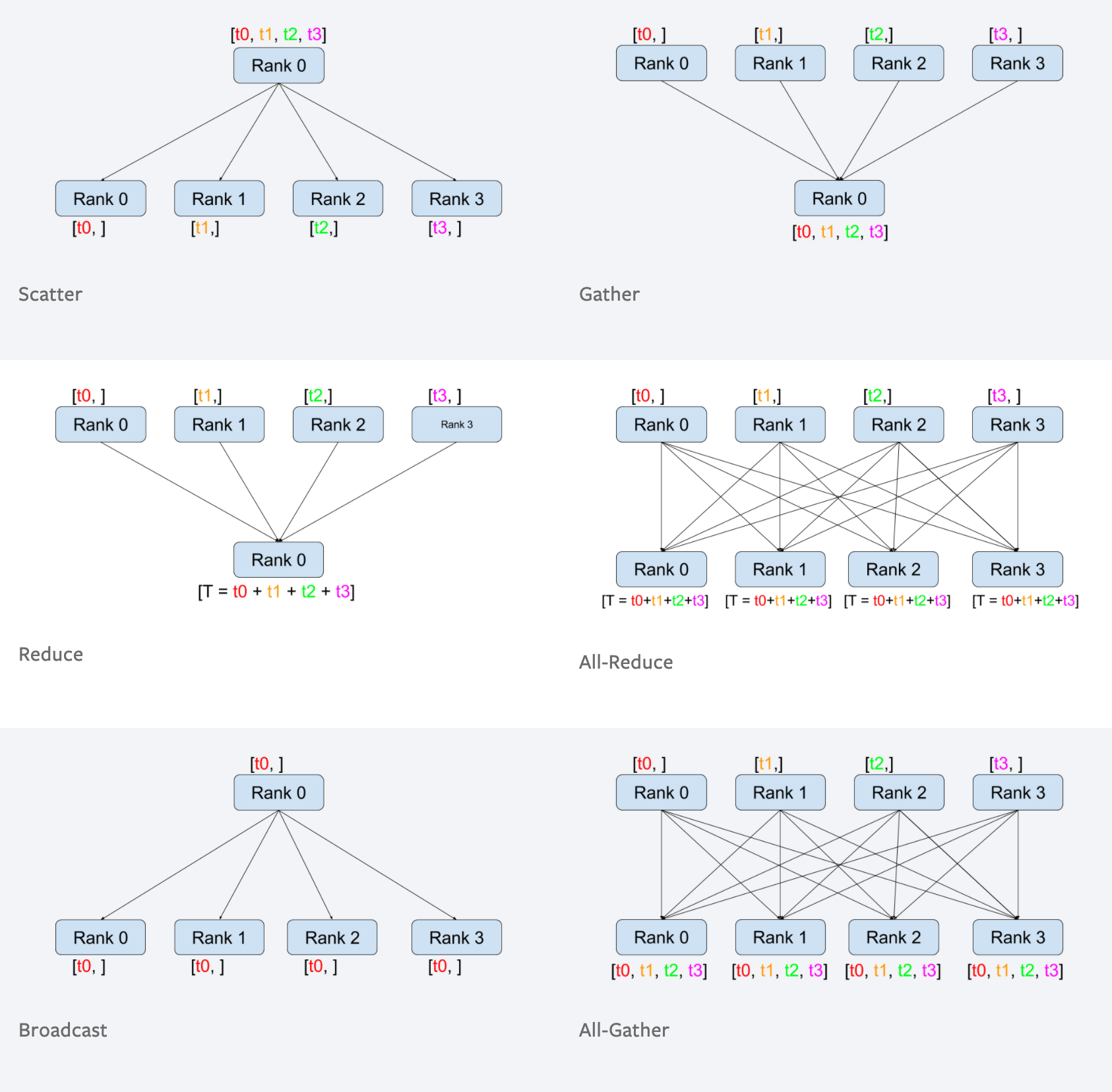
From Collective Communication in Distributed Systems with PyTorch
- Peer to Peer: one process send data to another process
- Reduce: The
reduceoperation intorch.distributedis used to combine tensors from multiple GPUs or processes into a single tensor on one of the GPUs or processes. - All Reduce: The
all_reduceoperation intorch.distributedis similar to the reduce operation, but instead of returning the result on a single GPU or process, it returns the result on all GPUs or processes. - Scatter: The
scatteroperation intorch.distributedis used to divide a tensor on one GPU or process, known as the root rank, and send a portion of it to each other GPU or process. The root rank is specified as an argument when calling the scatter function. - Gather: The
gatheroperation intorch.distributedis used to collect tensors from multiple GPUs or processes and concatenate them into a single tensor on one of the GPUs or processes, known as the root rank. The root rank is specified as an argument when calling the gather function. - Broadcast: The
broadcastoperation intorch.distributedis used to send a tensor from one GPU or process, known as the root rank, to all other GPUs or processes. The root rank is specified as an argument when calling the broadcast function. - All Gather: The all_gather operation in
torch.distributedis similar to the gather operation, but instead of returning the concatenated tensor on a single GPU or process, it returns the concatenated tensor on all GPUs or processes.
Ring All Reduce
The ring implementation of Allreduce has two phases.
- Share-reduce phase
- Share-only phase
The Ring All-Reduce is an algorithm that functions in a circular fashion. During the share-reduce phase, each worker processes a segment and passes it along in a ring structure. Specifically, the process begins with worker 0 at index 0, and each subsequent index is reduced by the next worker in the sequence. For example, the data at index 1 is reduced by worker 0, index 2 by worker 1, and so forth.
Data parallel
Gradients from all the replicas are aggregated using the bucketed Ring-AllReduce algorithm
- Host: host is the main device in the communication network. It is often required as an argument when initializing the distributed environment.
- Port: port here mainly refers to master port on the host for communication.
- Rank: a unique identifier that is assigned to each process (usally range from \(0\) to \(worldSize - 1\) )
- World Size: total number of processes in a group
- Process Group: consists of all the processes that are running on our GPUs
From Distributed Training by Shenggui Li, Siqi Mai
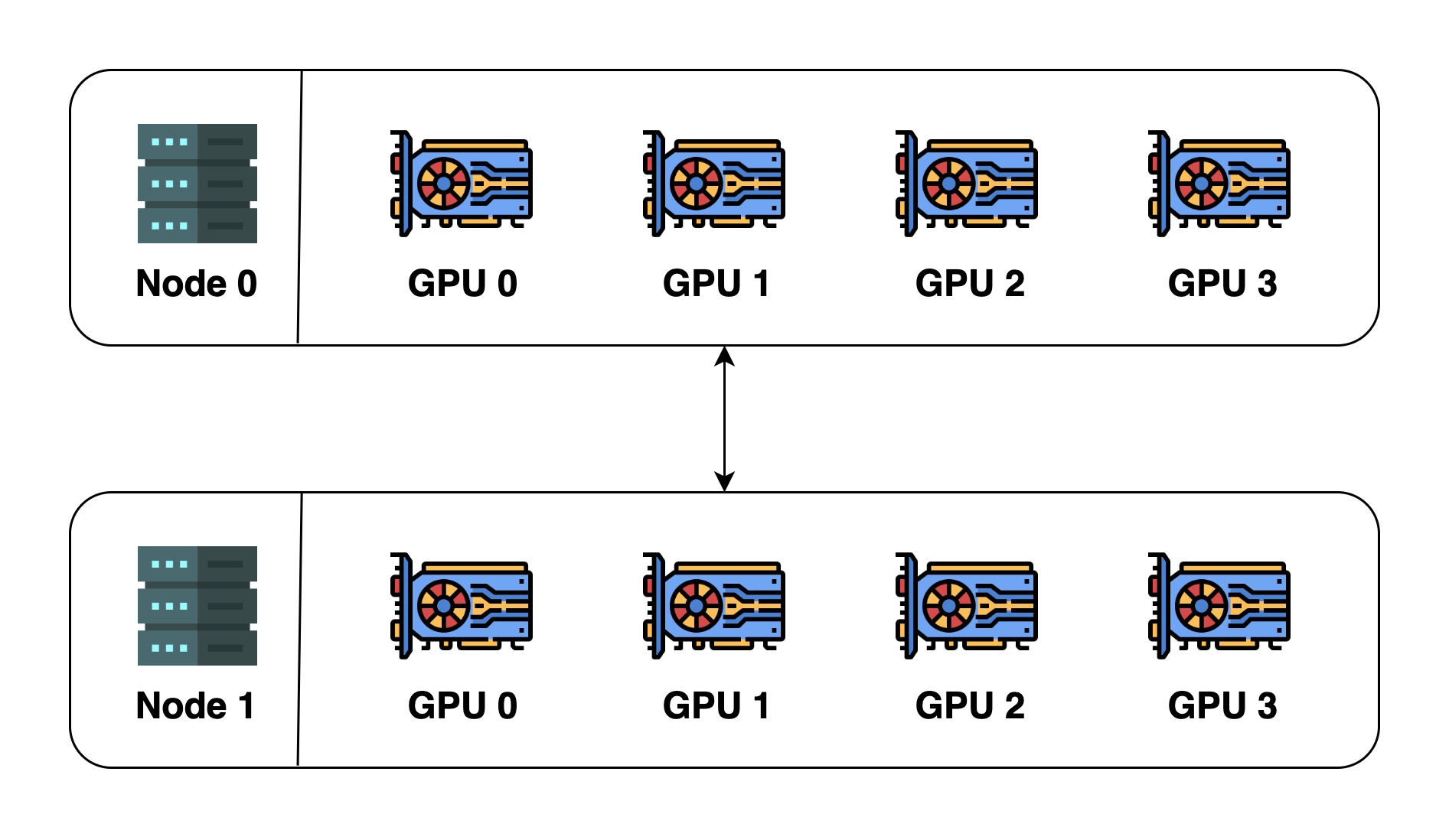
To illustrate these concepts, let's assume we have 2 machines (also called nodes), and each machine has 4 GPUs. When we initialize distributed environment over these two machines, we essentially launch 8 processes (4 processes on each machine) and each process is bound to a GPU.
Before initializing the distributed environment, we need to specify the host (master address) and port (master port). In this example, we can let host be node 0 and port be a number such as 29500. All the 8 processes will then look for the address and port and connect to one another. The default process group will then be created. The default process group has a world size of 8 and details are as follows: \[ \begin{array}{|c|c|c|c|} \hline \text { process ID } & \text { rank } & \text { Node index } & \text { GPU index } \\ \hline 0 & 0 & 0 & 0 \\ \hline 1 & 1 & 0 & 1 \\ \hline 2 & 2 & 0 & 2 \\ \hline 3 & 3 & 0 & 3 \\ \hline 4 & 4 & 1 & 0 \\ \hline 5 & 5 & 1 & 1 \\ \hline 6 & 6 & 1 & 2 \\ \hline 7 & 7 & 1 & 3 \\ \hline \end{array} \]
We can also create a new process group. This new process group can contain any subset of the processes. For example, we can create one containing only even-number processes, and the details of this new group will be: \[ \begin{array}{|c|c|c|c|} \hline \text { process ID } & \text { rank } & \text { Node index } & \text { GPU index } \\ \hline 0 & 0 & 0 & 0 \\ \hline 2 & 1 & 0 & 2 \\ \hline 4 & 2 & 1 & 0 \\ \hline 6 & 3 & 1 & 2 \\ \hline \end{array} \] Please note that rank is relative to the process group and one process can have a different rank in different process groups. The max rank is always
world size of the process group - 1.
Multi-GPU training with DDP (code walkthrough)
Single GPU
datautils.py
1 | import torch |
single_gpu.py
1 | import torch |
1 | python single_gpu.py 50 10 |
Multi GPU (mp.spawn)
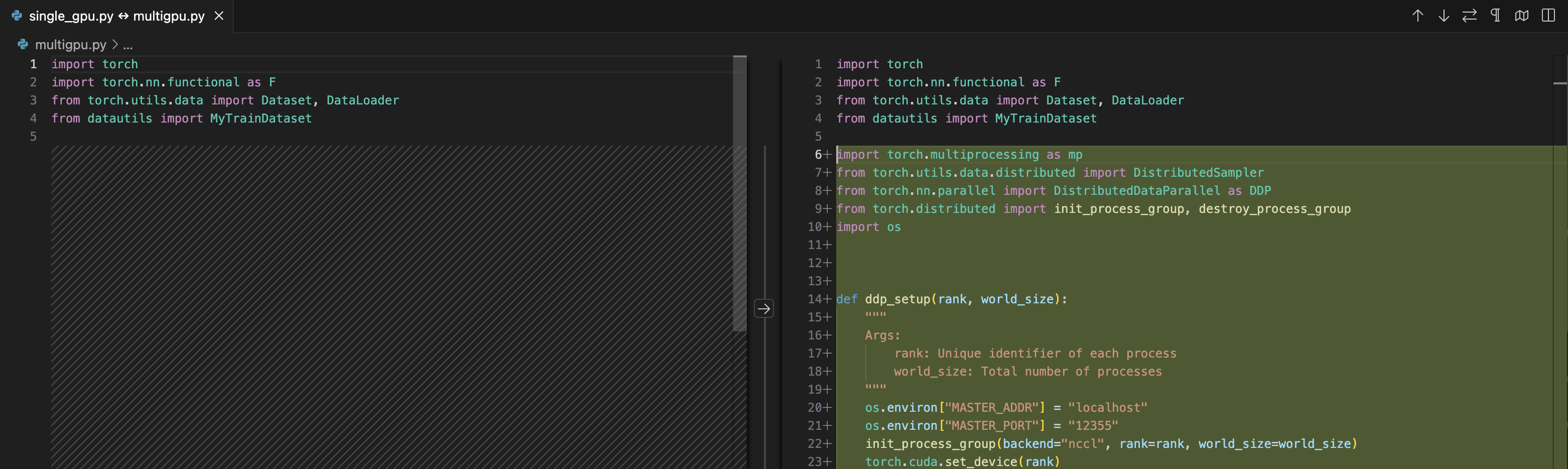
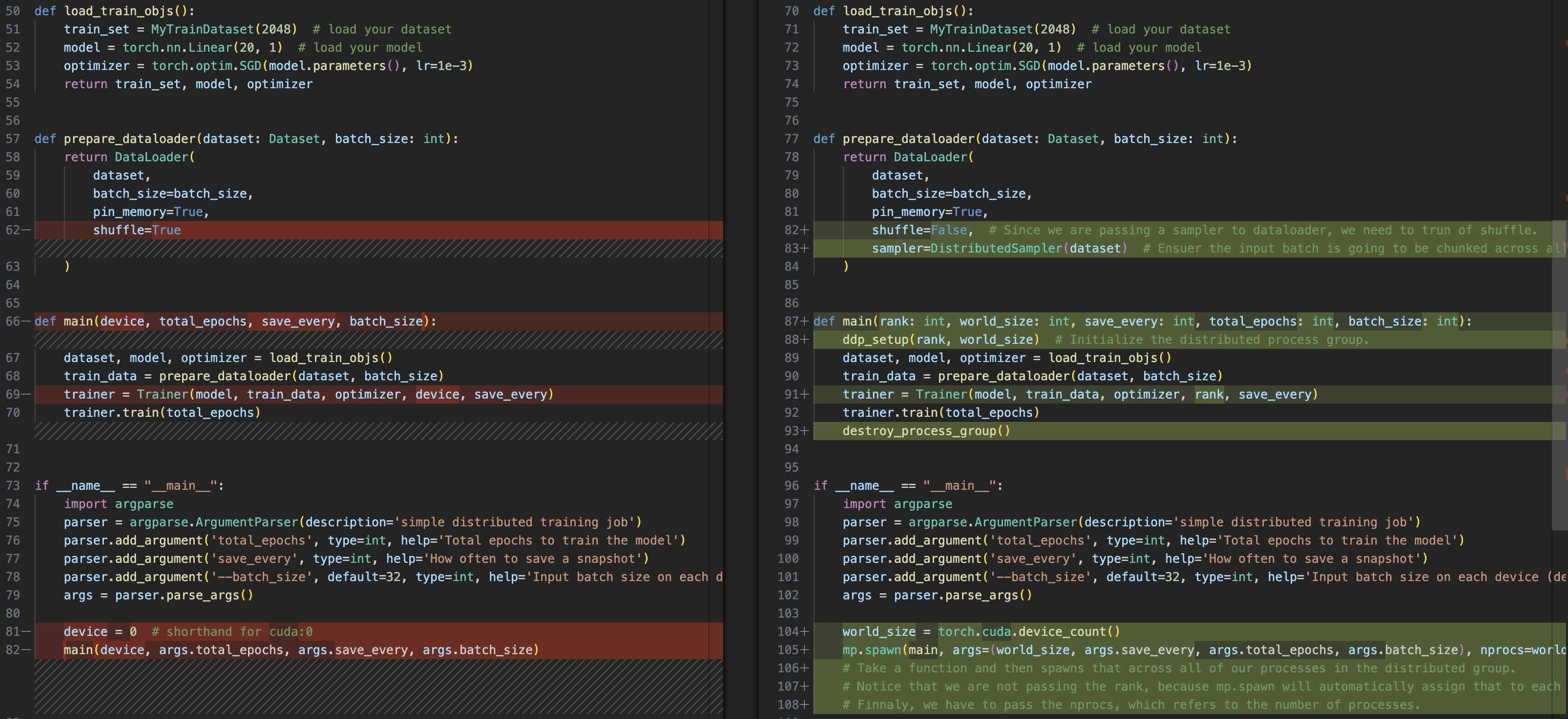
- os.environment:
MASTER_ADDRMASTER_PORT
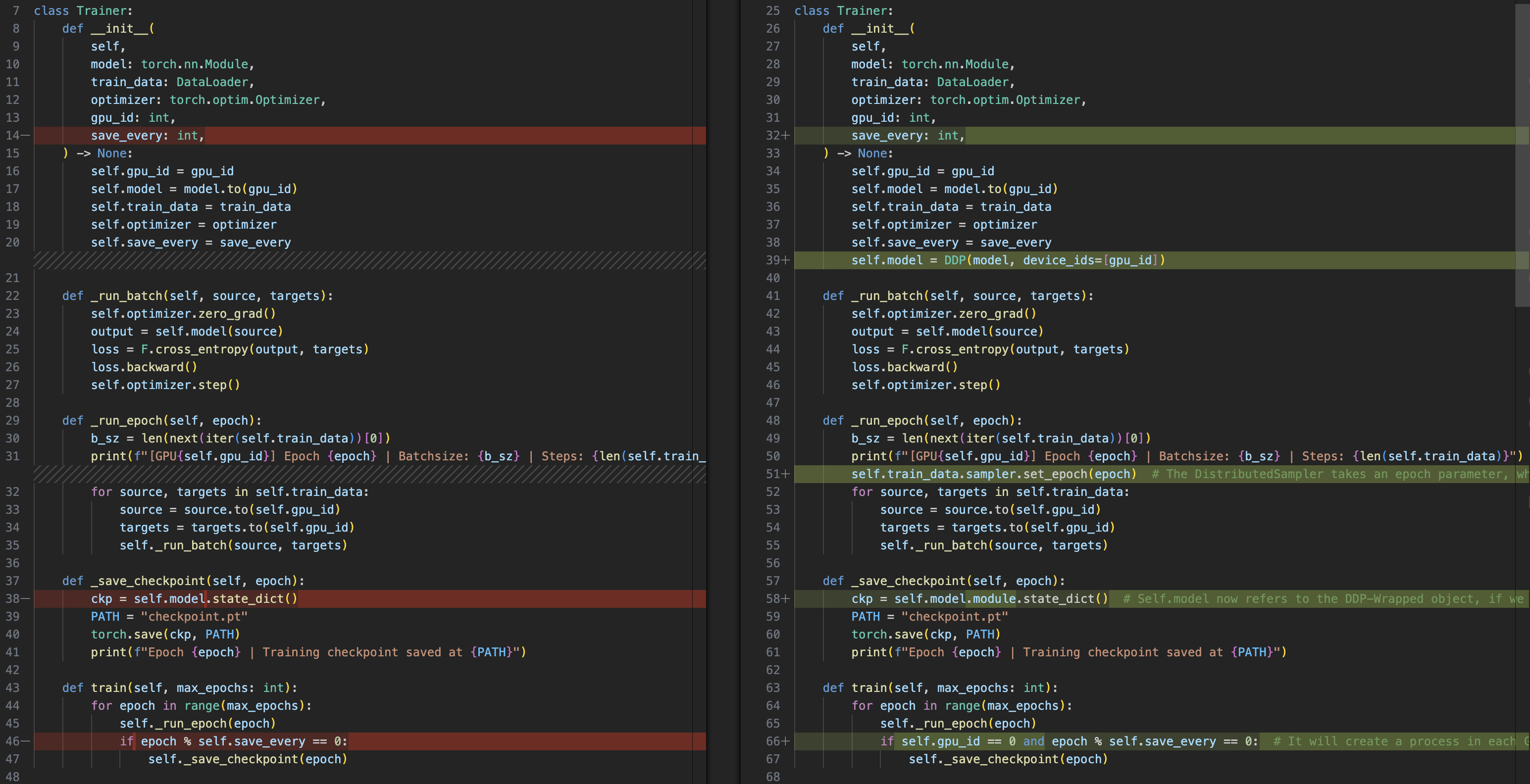
init_process_groupDDP(model, device)- Sampler:
- dataloader
shufle=FalseDistributedSampler(Dataset) dataloader.sampler.set_epoch
- dataloader
- save only
gpu_id=0 destroy_process_group()
1 | python multigpu.py 50 10 |
Fault-Tolerant Training (torchrun)
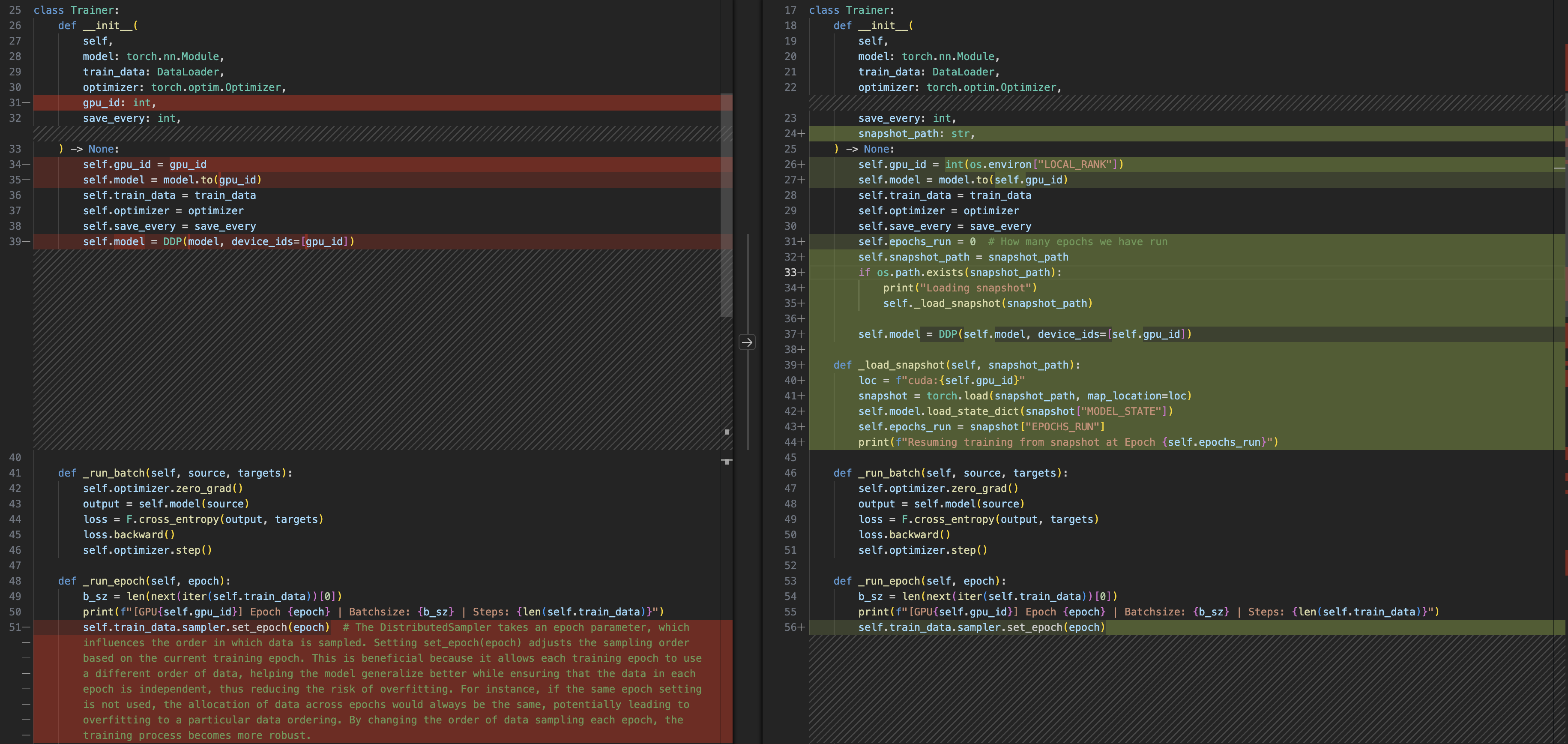
When scaling your job to multible devices, you of course, gain more performance, but you also increase the susceptibility of failure. A single job failure can throw your training job out of sync. Pytorch provides fault tolerance with torch run. And the idea is simple, your training script takes snapshots of your traning job at regular intervals. Then if a failure occurs, your job dosen't exit, torch run gracefully restarts all the processes, which load the latest snapshot, and you continue training from there.
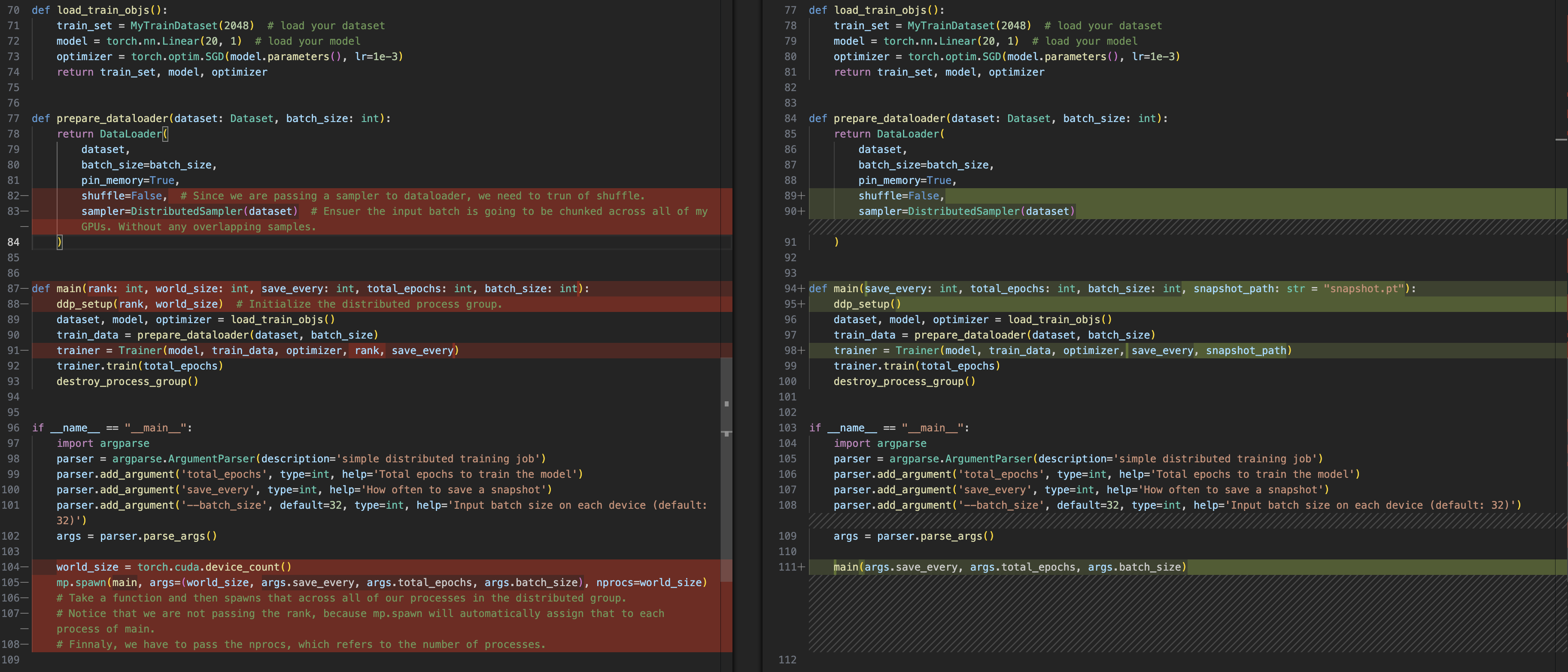
torchrun handles the minutiae of distributed training so
that you don't need to. For instance,
- You don't need to set environment variables or explicitly pass
the
rankandworld_size; torchrun assigns this along with several other environment variables. - No need to call
mp. spawnin your script; you only need a genericmain()entry point, and launch the script withtorchrun.This way the same script can be run in non-distributed as well as single-node and multinode setups. - Gracefully restarting training from the last saved training snapshot.
Belows are all:
multigpu.py <-> multigpu_torchrun.py
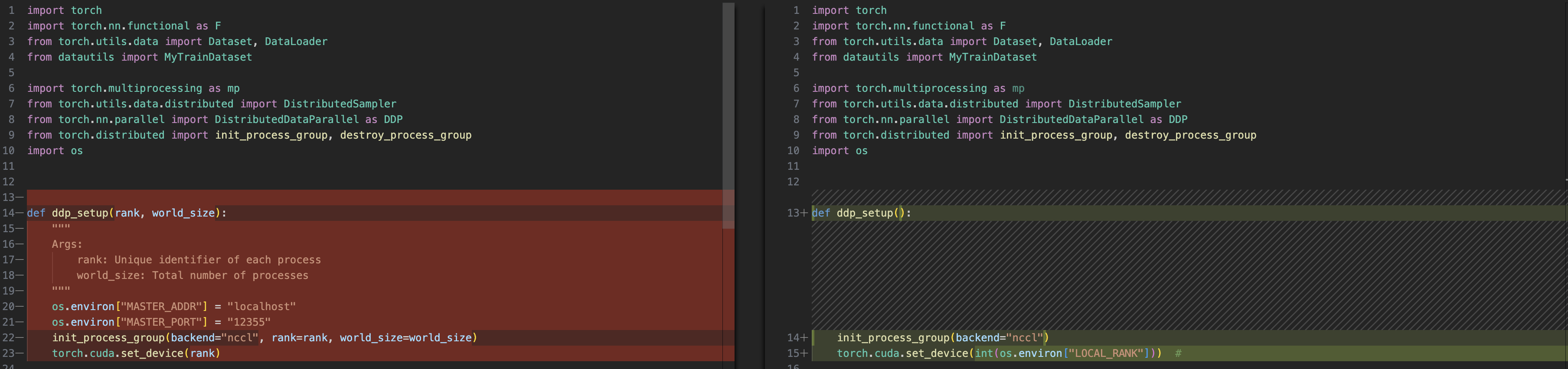
class Trainer

main()
gpu: using all gpus, you can replace it with en explicit
number
--standalone: singe node
1 | torchrun --standalone --nproc_per_node=gpu multigpu_torchrun.py 50 10 |
1 | W0602 17:29:24.735000 139896606601856 torch/distributed/run.py:757] |
Multi-node
Our training code really remains the same from torchrun. However, i'm gonna make a couple of tiny changes to my code for clarity.
Each GPU will have a local rank starting from 0
<img src="https://minio.yixingfu.net/blog/2024-06-02/截屏2024-06-02 22.00.40.png" width="50%">But the global rank is unique
<img src="https://minio.yixingfu.net/blog/2024-06-02/截屏2024-06-02 22.04.16.png" width="50%">For code, only add a self.global_rank for
Trainer and change all the self.gpu_id to
self.global_rank, only save checkpoint if local_rank=0 not
changed.
Method1: Running torchnode on each machine
For machine 0:
1 | Use the torchrun command to launch a distributed training task with PyTorch |
For machine 1:
1 | Use the torchrun command to launch a distributed training task with PyTorch |
- Common Troubleshooting:
- check your nodes can communicate with each other
- set a debug flag for verbose logs,
export NCCL_DEBUG=INFO - explicitly pass network interface name,
export NCCL_SOCKET_IFNAME=eth0
Method2: Running torchnode on slurm
Using a workload manager (Since i might not use it for quiet a time, skip this part)
Training a GPT-like model with DDP
in mingpt folder, run
1 | torchrun --standalone --nproc_per_node=gpu main.py |
I highly recommend the GitHub page for this section. It provides a detailed implementation of a handwritten GPT model using Distributed Data Parallel (DDP) training. This resource is excellent for understanding DDP, the model structure, and the pretraining process of GPT models.
Also, i add the hand wirtten CausalSelfAttention class
from minGPT to the code to model.py for a
deeper understanding of multi-head self attention
1 | """ |